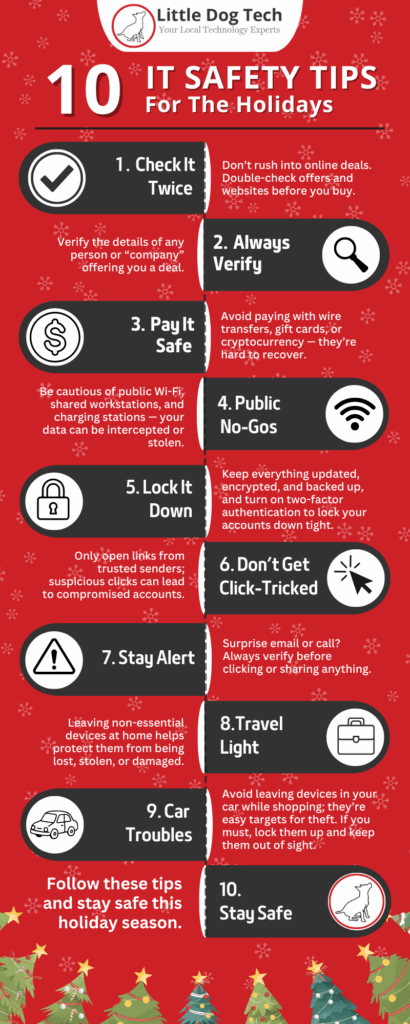
With holiday travel on the horizon, your phone, tablet, laptop, and smart devices are coming along for the ride. But travelling also means more tech risks—public Wi-Fi, shared charging stations, distracted security, and devices left unattended. That’s why focusing on Travel Tech Safety now matters.
Here are key tips (drawn in part from services and advice on the FTC’s official site) to help you protect your gear and data while you’re away.
🧳 Before You Go: Prep Your Tech
- Back up your data
Make a copy of your important files (photos, documents, contacts) to the cloud or an external drive. If your device is lost or stolen, you’ll still be covered.
- Update your devices
Install all updates for your operating system, apps, and security software. Updates often include important fixes for bugs that thieves or hackers exploit.
- Use strong passwords + multi-factor authentication (MFA)
Make sure you have a strong, unique password for each device/account. Enable MFA so even if someone gets your password, they still can’t log in.
- Review what you carry
Ask: Do you need every device for the trip? Could some data be left at home? Fewer devices = fewer risks.
🎒 While You’re On the Road: Stay Vigilant
- Be cautious with public Wi-Fi or charging stations
Unsecured Wi-Fi or public USB-charging ports can be traps. If you must use them, avoid logging into sensitive accounts. Consider using a VPN.
- Turn off auto-connect features
Many devices will automatically join open networks. Disable this so you choose when/where your device connects.
- Keep devices with you (or locked up)
Never leave a phone, laptop, or tablet so someone else can grab it easily. In airports, hotels or cafes, stay alert.
- Use location services and remote-wipe features
Set up “Find My Device” or equivalent so you can track or wipe your device if it’s lost or stolen.
- Be careful what you share online
Posting vacation photos or live updates can advertise that you’re away, which could invite theft. Also, check your privacy settings. IDX
🧑💼 For Businesses / Teams: Travel Smart with Work Devices
- Ensure any company laptops/tablets travelling with staff are secured, encrypted, and managed.
- Limit which accounts can be accessed on the device while traveling.
- Consider issuing a “travel mode” checklist, so employees know what tech to turn off or limit while away.
✅ When The Trip’s Done: Post-Travel Check
- Change key passwords (especially if you used public Wi-Fi).
- Check bank/credit card statements for strange charges.
- Remove devices from location sharing if you enabled them just for travel.
- Clean up any cached credentials or files you only used during the trip.
The Bottom Line
Travelling doesn’t mean you have to leave your tech safety behind. With the right prep and awareness, you can enjoy your holiday without giving hackers or thieves an open invitation. Focus on Travel Tech Safety, follow the simple steps above, and if your device does act strangely when you get home, our team at Little Dog Tech in Urbandale is here to help — from hardware fixes to data protection.